

A job posting tells you what a company wants from you. It says almost nothing about whether the company is worth joining.
Open any role on JobWeb Board, click Ask AI, and pick the assistant you already use. The posting opens there with a structured research prompt already written, covering the company’s financial health, market position, the role’s history, likely tech stack, employee sentiment, and warning signs. No JobWeb account needed.
One thing before the details, because the order matters: this is not the first step in a search. Researching every posting that looks plausible burns a week on roles that were never going to clear your basic requirements anyway. Filter first, then investigate what survives.
Where the button is
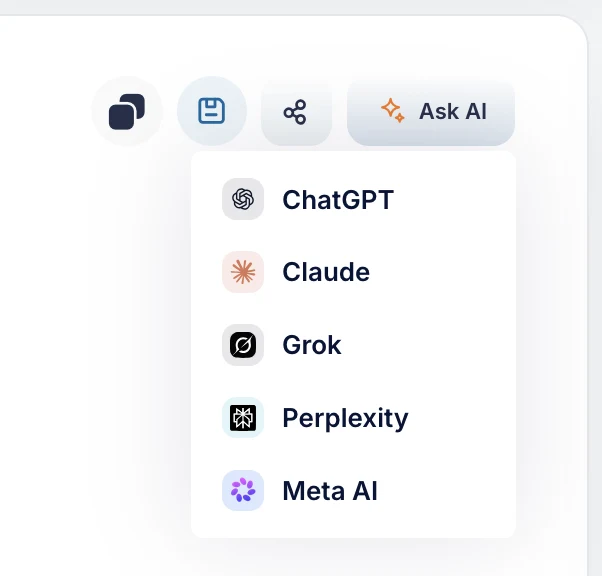
Open any job on JobWeb Board and there’s an Ask AI button sitting above the description, next to the copy and share controls. Click it and you get a short menu: ChatGPT, Claude, Grok, Perplexity, Meta AI.
Nothing to copy, nothing to paste. JobWeb doesn’t run a model and never sees the conversation that follows: the prompt opens directly in the assistant you chose, under your own account and that provider’s privacy terms.
What it actually asks for
The prompt isn’t “tell me about this job.” It asks for a structured due-diligence report and, importantly, tells the model not to make things up:
- Company health: funding history, financial state, runway, stage and risk profile
- Market: total addressable market with a cited source and year, competitors, differentiation
- Role details: reporting line, backfill and turnover signals, likely salary range with a confidence level
- Tech stack: inferred from postings, the engineering blog, public tooling profiles
- Employee sentiment: patterns across Glassdoor, Reddit, Blind
- Red flags: layoffs, leadership churn, funding gaps, long time-to-fill, litigation, negative press
It also instructs the model to cite references, separate opinion from fact, and decline to guess rather than fabricate. That last part matters: an unprompted “research this company” often returns confident nonsense, and the difference between a useful report and a plausible one is whether you asked for sources.
What it actually returns
We ran it on a live posting: a senior Python engineer role at Hugging Face, US remote, working on their open-source tooling. Fifteen seconds, one click.
What the posting said. Remote, senior, equity as part of the package, benefits listed. No salary.
What came back. The report opened by stating its own limits, that facts would be attributed, opinion labelled as opinion, and that data on private-company internals is incomplete. Then, across the categories the prompt asks for, it surfaced the things the posting had left out:
- No published salary band anywhere. The only figures available were third-party estimates spanning roughly $124K to $235K depending on the source, and the model flagged its own confidence in them as low-to-moderate rather than presenting a number.
- The equity is illiquid, because the company is private. Obvious once stated, easy to gloss over when a posting says “equity included.”
- “Reporting line: not stated in the posting.” Same for backfill and turnover signals. The report was explicit about what it could not determine rather than filling the gap.
- A list of things to ask about, drawn from public reporting on the company’s funding, headcount, and press coverage, each attributed to a source and separated from the analysis.
What that supports. Worth a recruiter conversation, with compensation structure and reporting line as the first two questions, and not worth tailoring a resume until the band is confirmed. That’s a better-informed decision than the posting alone could produce, and it cost a quarter of a minute.
Notice what the most useful output was: not a verdict, but an inventory of what the posting never told you. It closed by saying as much, recommending we verify financials, equity terms, and reporting structure directly during the process, because public data on a private company is incomplete.
What the AI can and can’t settle
Fitcheck and an assistant answer different questions, and it’s worth being precise about which.
Fitcheck is a pipeline, and in one sense an unusually good search engine, because its data set is everyone else’s: every job alert you already receive, from any board that sends them, forwarded in and read for you, plus our own board, plus a shared pool of postings that other people’s alerts surfaced. Each gets resolved back to the employer’s own listing and checked against the title, pay, location, and work mode you set. What it does not do is form a view on the company, because none of that is in a posting to check against anything.
The assistant goes after exactly those questions, using sources outside the posting. It cannot replace the pipeline, for reasons we went through separately. But it’s inferring too, from public and sometimes stale material, so treat funding stage, headcount trends, and sentiment as leads to verify rather than facts. And be careful with silence: if a posting never mentions remote work, the answer is unknown, not no. Missing information stays missing. The value of asking with your criteria in hand is that a good assistant will tell you which of them the posting never addressed, instead of quietly assuming they’re met.
Why we didn't build another AI wrapper
We could have run a model over every posting, called it a feature, and added a tier to the pricing page. It would have been worse. You already have an assistant that does this well, and the report is better in a chat where you can push back, ask the follow-up, and click the sources.

When to use it
Not on everything. Twenty AI reports is the same time sink as twenty job postings, just automated.
Use it on the roles you’re seriously considering, once a posting has cleared your basic requirements. The research pays off most at the moment you’re about to spend an evening tailoring a resume, because that’s when finding a hiring freeze or a leadership exodus saves you the most. For the deeper version, including how to bring your own resume into the comparison, we wrote the full method in Stop applying blind: use AI to vet companies first.
Try it on a live posting. Open any job on the board, click Ask AI, and pick your assistant. It costs nothing and takes a minute.
Then, if the problem you actually have is getting from a thousand postings down to the few worth that minute, that’s the part Fitcheck does: it checks every new posting against your criteria and returns which to Apply or Review, and Skips the rest. Filter first, research second.